Matchworks 2026 Quality assurance (QA) and UX review
Testing and UX review of the client portal
I review the Matchworks client portal and admin before and after each release, and turn what real clients struggle with into tickets the engineers can fix.
This case is on the role pages for Support.
The problem
Matchworks runs a client portal where clients see their campaign and pay, and an admin where the team runs accounts. A screen can pass its tests and still confuse the person using it.
What I do
- Release QA: I click through the portal and admin on each release and log what breaks or reads wrong.
- Session replays: I watch PostHog recordings (screen recordings of real visits) of real clients using the portal and turn each sticking point into a Linear ticket with the replay attached.
- UI and UX notes: layout, copy and flow changes written so an engineer can act on them without a meeting.
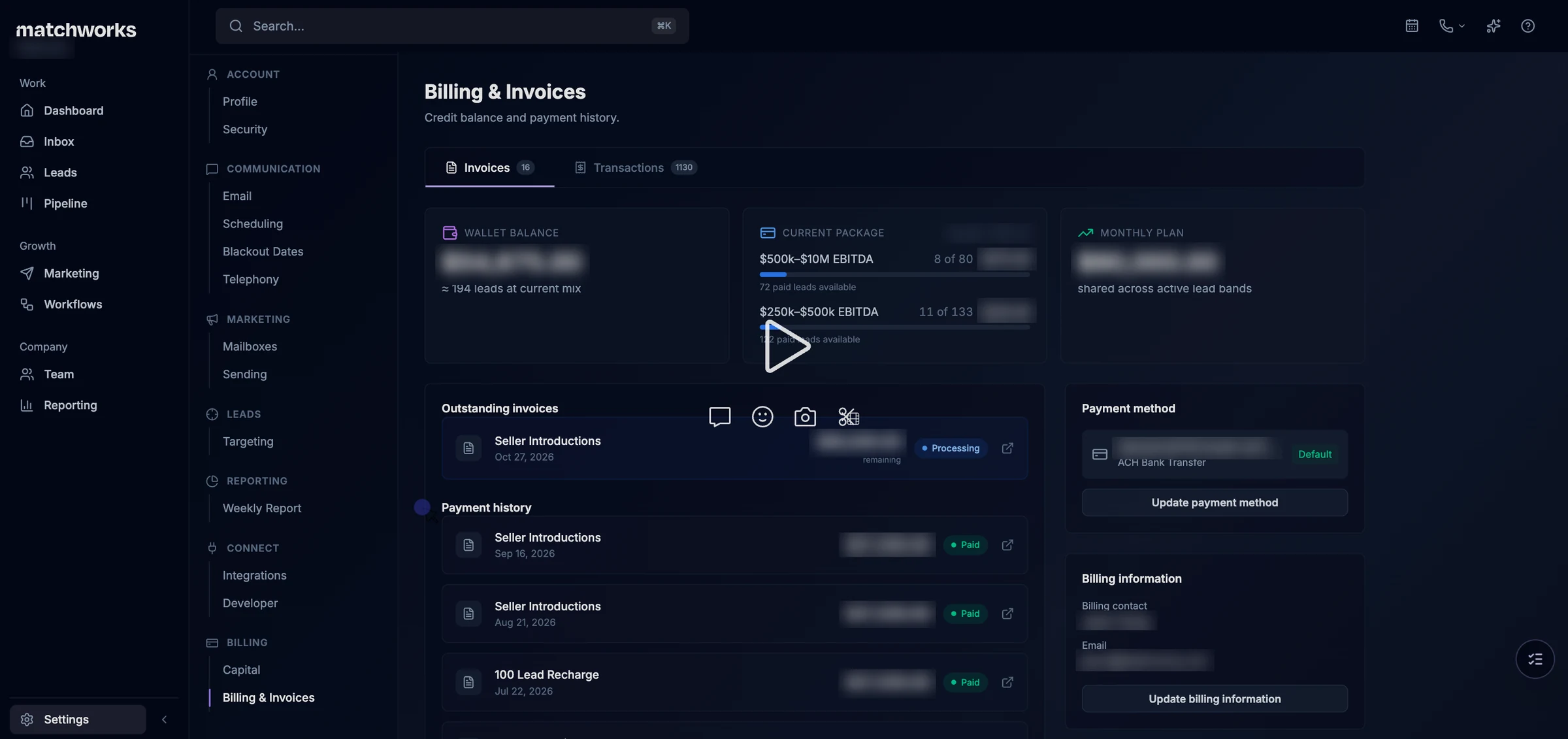
What one replay showed
A client’s admin tried to get PDFs out of two leads: three download clicks in three minutes, plus one export window that opened and gave no download at all. The data could not show whether any of the downloads worked, because the portal logged the click and nothing after it. So I asked for success and failure tracking on every download before anyone chased the retries.
One ticket from start to finish: MAT-2318
On 7 November 2026 one replay turned into six tickets and one question for Mike, the founder.
1. What I saw
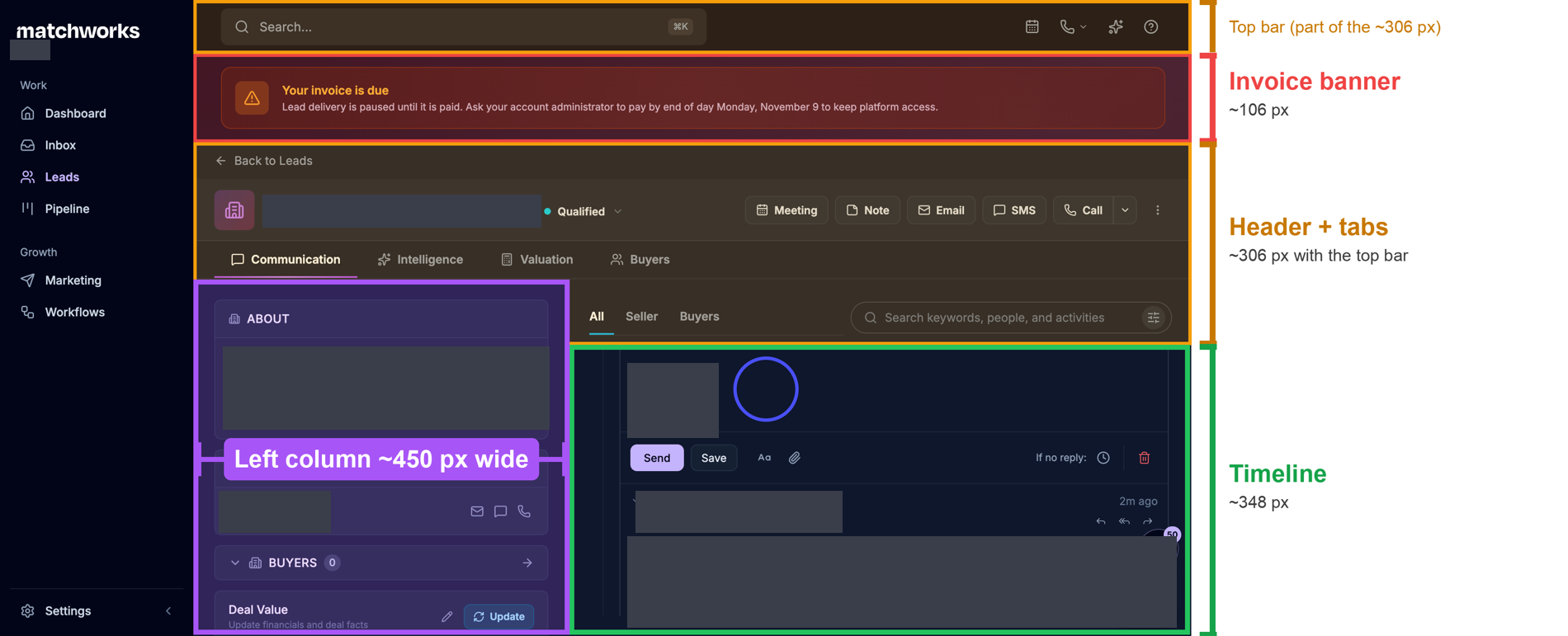
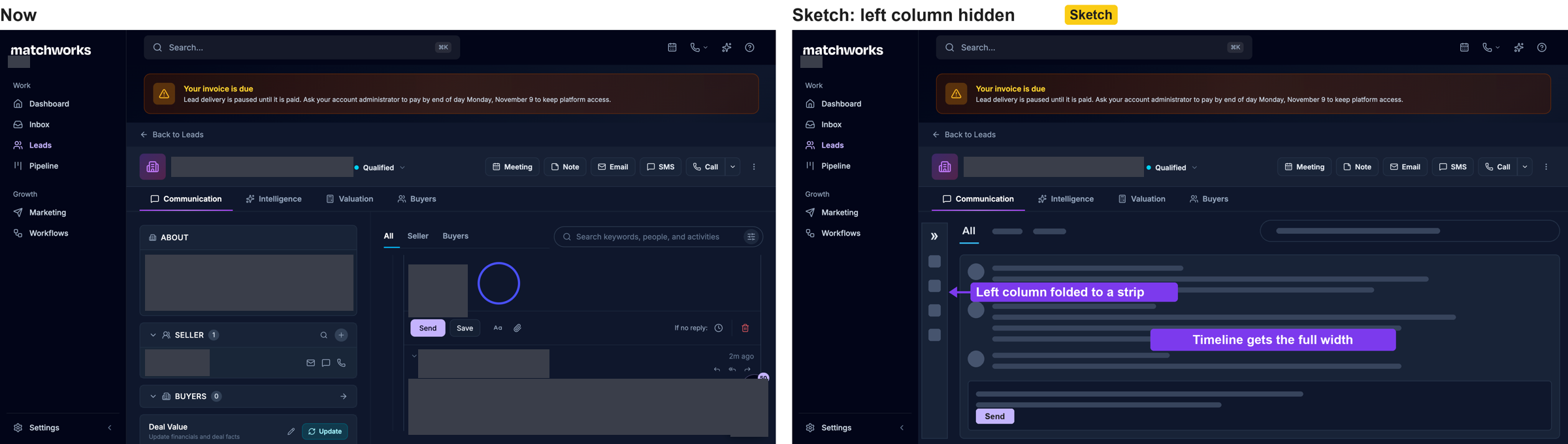
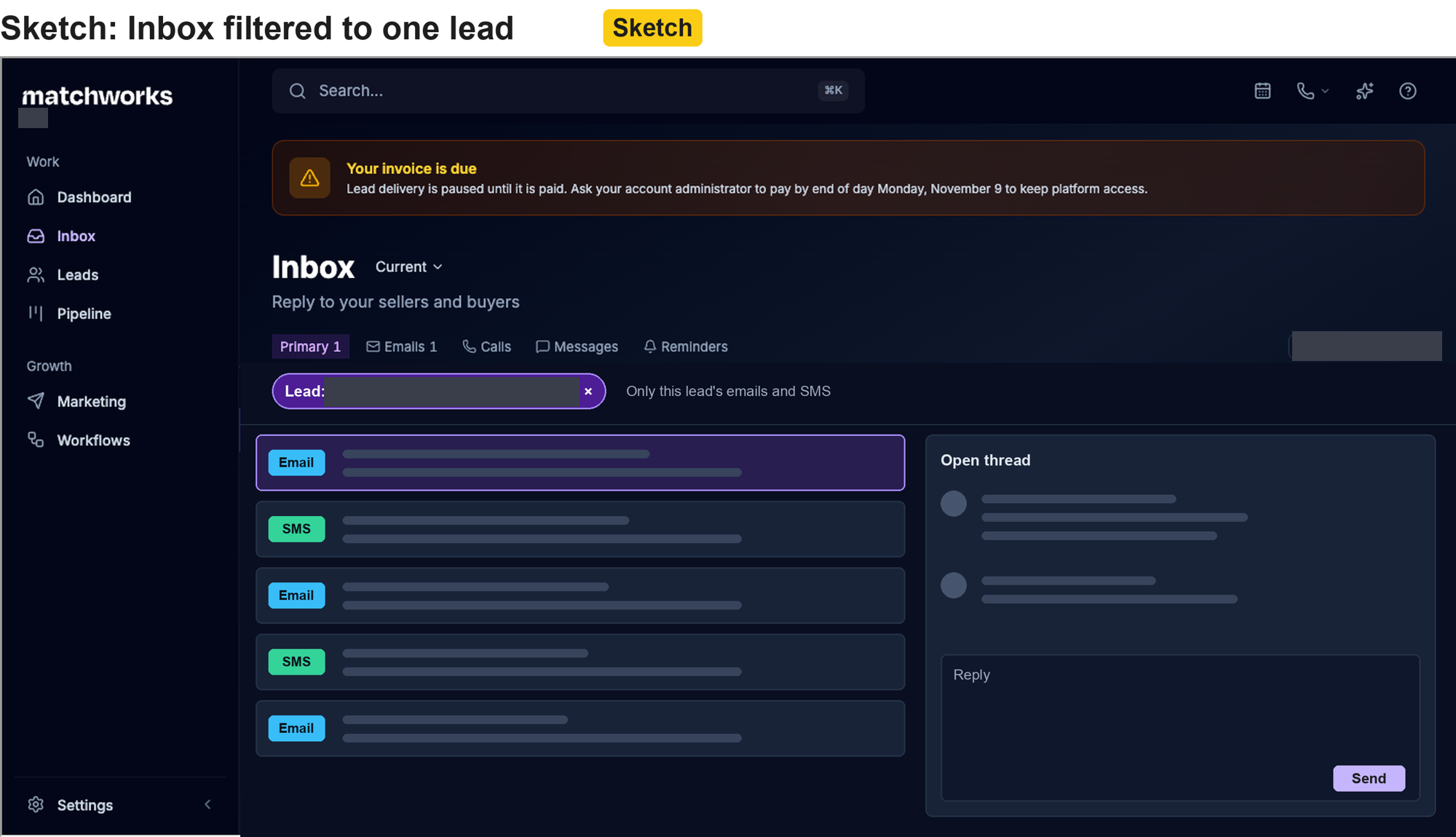
At 3:39 pm I was watching a client work a lead on the Communication tab, where emails, SMS and calls to that lead sit on one timeline. The client kept scrolling a short timeline. The “Your invoice is due” banner could not be closed and pushed everything down. They opened Inbox once, found no way in by lead, and went back. My notes from that minute named the banner and suggested letting users fold away the left column so the timeline gets more of the screen.
2. What I tested
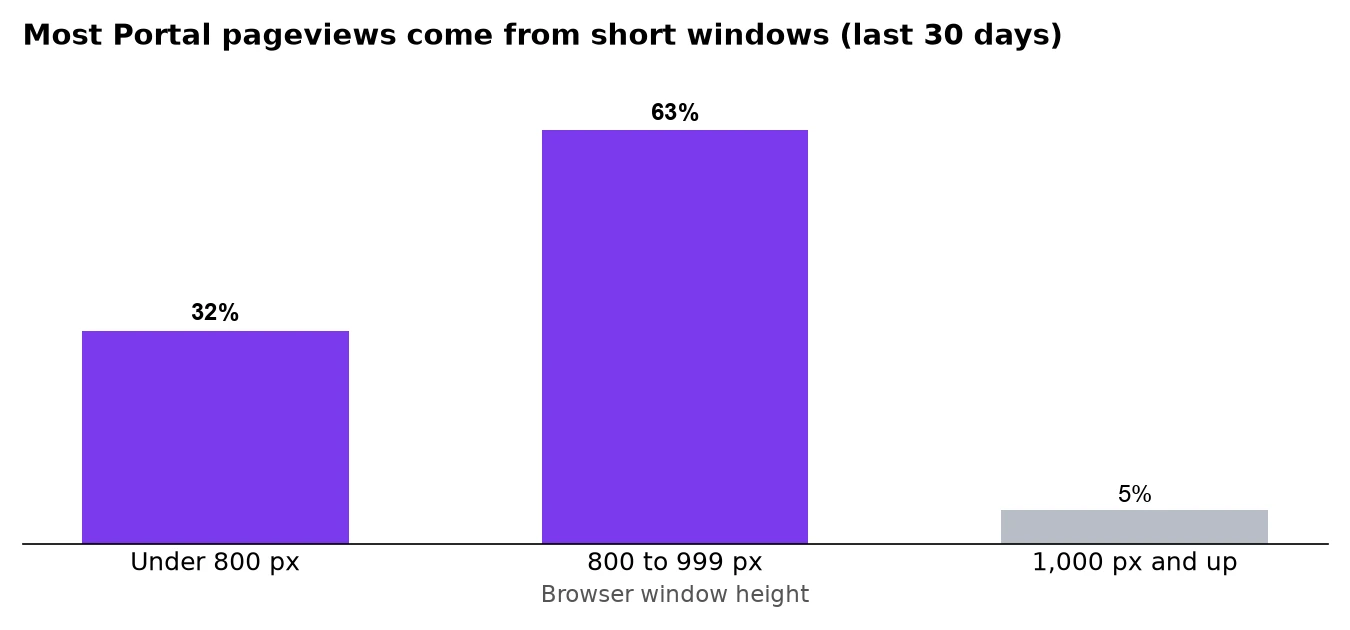
One user on one laptop is a single case, so I checked whether the cramped view was common. In PostHog (the analytics tool), 95% of client pageviews in the last 30 days came from windows under 1,000 px tall, and 32% from windows under 800 px. Then I measured that client’s screen: the banner took about 106 px, the header and tabs about 306 px, and the timeline was left with about 348 px. The left column took about 450 px of width, and the client barely clicked it.
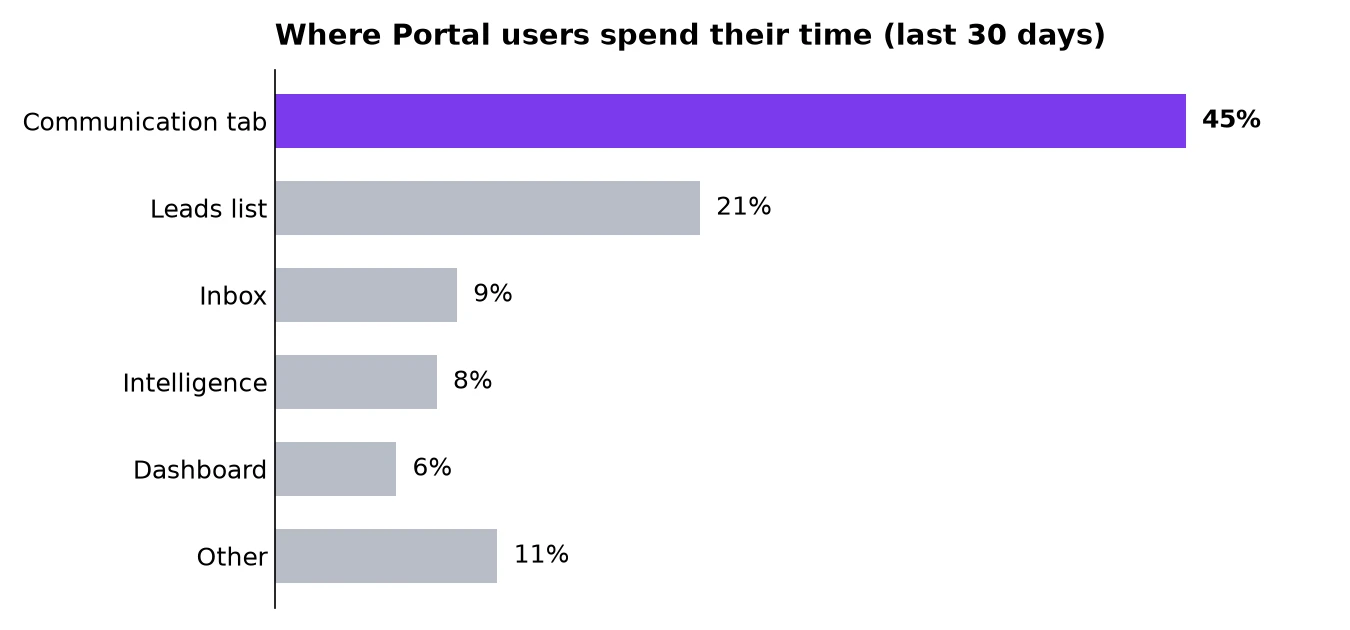
At 4:23 pm I wrote down the case against my own point: on a bigger screen the page feels less cramped. The time data answered it. The Communication tab holds 45% of all time spent in the portal, and Inbox 9%. Whatever screen they use, clients spend most of their time on this one view.
3. What else was broken on the same path
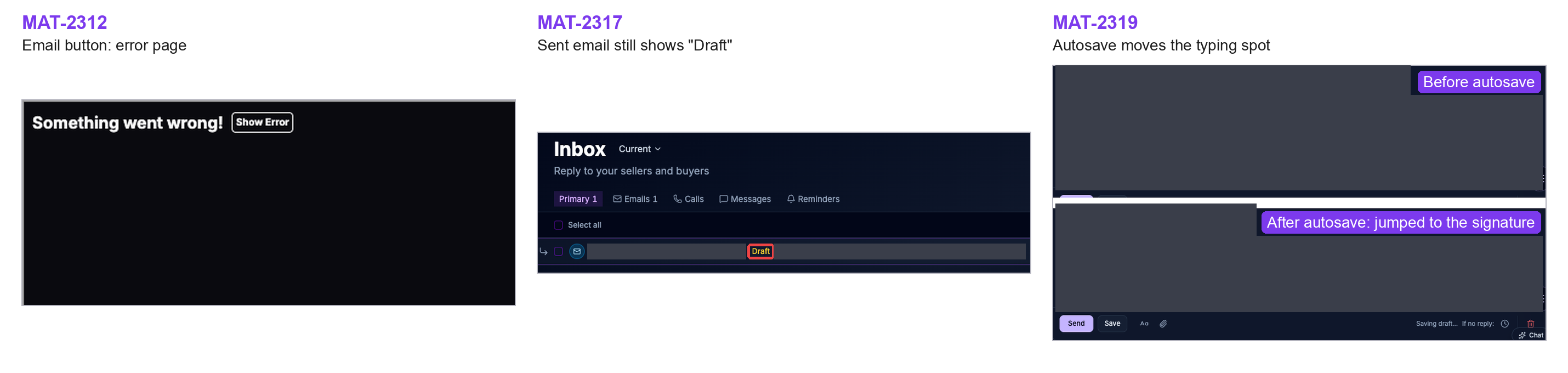
The same afternoon’s replays turned up three bugs on that email path. The Email button crashed to an error page. Inbox showed a sent email as “Draft” until a reload. Autosave moved the typing spot below the signature. Two older tickets showed similar draft errors. I filed each as its own bug and wrote that they might share one cause in how drafts are saved, and labelled that as a guess, because nobody had read the code.
4. What I wrote
At 4:30 pm I filed MAT-2318 as the parent ticket in Linear and put the five related tickets under it. A first draft listed the bugs and asks as text. At 4:44 pm I had it rebuilt so the problem comes first as pictures (who is hit, where the space goes, the bug frames) and my suggestions come after, each with a sketch:
- Let users fold the left column to a strip, so the timeline takes the full width.
- Add a lead filter to Inbox: pick a lead and see only that lead’s emails and SMS.
- Make the invoice banner one line.
The ticket opens with a one-line summary and ends with one question for Mike: more room on the lead page, an Inbox built around leads, or both.
I watched the replays, wrote the notes and chose the suggestions. Claude Code pulled the PostHog numbers, drew the charts and sketches and drafted the ticket body, and I sent it back until it read the way Mike needed it.
5. Who decides
The direction is Mike’s call. My end-of-day report on 7 November listed the six tickets and asked him to pick one. As of 10 November all six are still in triage, and nothing from this ticket has shipped.
Decisions
Follow the paths real clients take
I follow the paths and settings real clients use, and trace where each one came from.
Review the heaviest users most
The clients who use the portal most get the most of my review time.
Read each replay for the next move
I read each replay for what the client will try next.
The result
- 19 QA tickets filed from 16 September to 7 November 2026, 4 of them shipped
- I know the platform well enough to sit in on a client’s call
What I’d change
I should have been more confident in my taste and shared my opinions sooner. Mike values my thoughts, and each one I held back for fear of a mistake was a thought waiting to be shared.